How I share links on my blog
 Michael Harley
6 min read
Michael Harley
6 min read
I've always felt the need to share links that I find interesting. I think it helps like-minded people find their tribe. I'm unsure if my efforts have helped much, yet I persist.
A few days ago I got an email from Antonio Santos asking how the links in my feed work. They have a blogroll page on their site, but it never makes it into their feed, and they wanted to know what I was doing differently. Then a second email came asking whether I write the titles and the slugs by hand, or whether something does it for me.
Both are good questions, and the answers aren't really specific to me, so I figured I'd answer them out here instead of just in an inbox.
The most important thing to understand is that my links are just another post type, but instead of being posts, they're links. They behave the same way insofar as they get their own folder, and each link I'm sharing gets its own file with its own frontmatter. The part that matters most is that they go into the same feed as everything else, instead of sitting on a page by themselves.
Before I get into it, I do want to be upfront with the fact that I used Claude Code to help me build the technical bits of this workflow. I directed it, as I had a vision and understanding of what I wanted, but I didn't hand-write the JavaScript that builds the pages or the feeds.
So if we take this link as an example, the markdown file on disk looks like this:
---
date: 2026-08-09T16:27:33.000-04:00
title: "The reason software engineers do not write blog posts..."
linkTitle: "The reason software engineers do not write blog posts..."
url: "http://www.screamingatmyscreen.com/the-reason-software-engineers-do-not-write-blog-posts/"
permalink: /links/2026/08/09/the-reason-software-engineers-do-not-write-blog-posts/
layout: "link.njk"
tags: "links"
---

> ...is them working on their blogging software, static site generator and deployment pipelines. And once that is done, it is time to write about all of that and then never publishing another post again. Granted, that joke has been made too many times, but let us be honest… it is not really wrong. I am guilty of that as well, but at least I try to write somewhat regularly.

You know, I've stopped fighting it. Bloggers who are software engineers like to mess with the software and talk about messing with the software, present company included. I have a blog because I enjoy building it and tinkering with it. I have a blog because sometimes, I like to write. So I just accept it, and I'm less disappointed in myself for not writing like a *proper blogger*.
dateandtitleare standard fields.linkTitleholds whatever the source page called itself, so I can tidy up my own heading without losing the original if I want.urlis the source link I'm sharing.permalinkis the address the link lives at. I set it at first publish and it never changes after that.layoutis the Nunjucks file 11ty uses to format the output.tagsis basically the content type.
Then the build adds the new links entry to the RSS feeds. I have a firehose feed, which is all content types I publish, and I have a links specific feed which is only links of course.
Do I make all of that by hand?
For a long time, yeah. A link post is a text file in a folder, and there's nothing stopping me from opening a text editor and typing those seven lines out myself. If you want to start sharing links this week, that's all that you have to do.
But I've shared a few hundred of these now, and typing the same seven lines a few hundred times adds friction that I don't want. I want to be able to quickly share a link on my site and have it syndicate to All. The. Places. So, I built something to make this easier for myself. I have a little authoring app I call studio, and these days it does the repetitive but fiddly bits.
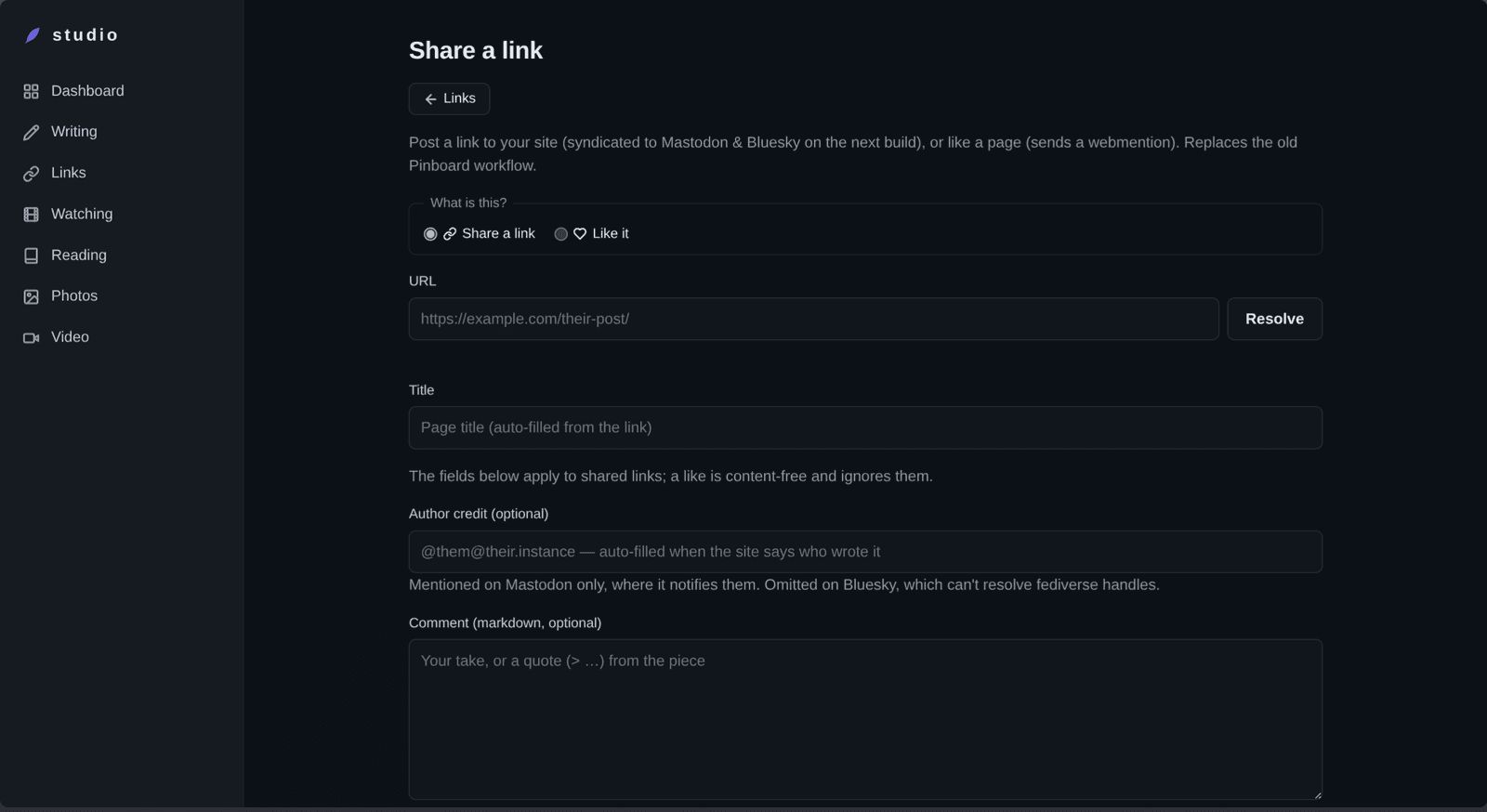
There's also a little JavaScript bookmark thing I can use to initiate the same workflow as this form.
I paste in the URL and click Resolve. Studio goes off and fetches the page, then pulls the title out of it. I write my comment, or I don't (plenty of my links are just the link), add tags if I feel like it, and hit publish.
The title comes from the page itself. It looks for the post's own title first, then the og:title a page advertises for social cards (usually the clean one), and only falls back to the <title> tag. The order matters because <title> is usually padded. That Guardian piece about Oracle layoffs carries "US tech firm Oracle cuts thousands of jobs as it steps up AI spending | Oracle | The Guardian" in its <title>, and just the headline in its og:title.
The slug comes from the title, run through the same slugify function the rest of my site uses (one function, everywhere, for reasons I'm not getting into here). Studio takes that and the date and builds the full address. Then it writes the file and commits it.
How I decided it should look
I've spent a fair amount of time and energy trying to get the look and feel of a link post to look right. In the syndication channels like Mastodon/Bluesky, on the page on my site and in the RSS feeds.
On the page itself, the heading is just the title. The source link is its own thing underneath the post: the site's favicon, then "Read on [host]".
Over on my links page and in the feeds, a link is sitting next to a post and a photo and a book I finished, so a small 🔗 tells you what you're looking at before you commit to it. That's where a marker earns its keep.
When a link goes out to Mastodon, the headline links to the source (which is also what makes Mastodon build its preview card from the article instead of from me), and then my own page shows up underneath it, labelled "On my site:". That label exists because I got it wrong the first time. I had the bare URL sitting there on its own line, on the theory that it read like a person linking their own write-up. It doesn't. A toot with two links in it and nothing explaining either one gives you no way to tell which is mine. Bluesky gets a leaner version of the same thing, because 300 characters is 300 characters, and the RSS feeds just get a "Read on [host] →" at the end, since the entry title is already sitting right above it.
So what?
Antonio wrote back to say they're going to try it. Their blog runs on Django, so it means building a new content type, and then routing it into the feed they already have.
Which is sort of the whole point, I think. None of this needs 11ty, or my little authoring app. You decide what counts as a post on your own site, and then you make your site do that, on whatever stack you've already got.
I still don't know if sharing links helps anybody find their tribe. I hope it does. Somebody I'd never met read something in my feed, emailed me about it, and is now off building their own version of it. That's cool.
How do you share links? Do they live in your feed with everything else, or on a page by themselves?







Thread
@michaelharley
Your studio application looks great! Is this a web app or a desktop application?
@82mhz thanks! It's a self-hosted Node/Express web app.