Re: The Loss of Links Continues
 Michael Harley
4 min read
Michael Harley
4 min read
I've been thinking about how resilient my site and posts are lately, so I found Naty S's post, Re: The Loss of Links Continues, where she writes about her efforts to mitigate link rot, to be quite relevant and interesting.
Do not contribute to link rot!
I think one important piece of the link rot puzzle that Naty S doesn't address is that we bloggers should not contribute to the problem if we can help it. If you must change the slugify rules for your site, at least set up redirects so people can find where the links moved to.
I personally pin the permalinks for my posts when I first stamp the frontmatter values. That is, the initial publish sets the link and nothing ever changes or recalculates it. That way, a change to how a project handles slugify filters doesn't affect my existing posts.
Finding the rotten links
My therapist says we can't control what other people do with their sites. That doesn't feel right but I trust her and will take her word for it. So then what do we do when someone is careless with their slugify formulas or they decide to shut down their site or move to a new domain without a redirect? One thing we can do is submit their link to the Wayback Machine so that even if their link does change or dies, then we still have a backup link we can use.
Step 1, build the list of links. My site is built with 11ty, a static site generator. During the build step, my site adds new links to a list of all the links that it links to. Let's call this links.json. As I type these words, there are 2,745 links tracked in links.json.
Step 2, perform the liveness check. How do we know if a link is dead or alive? Well, we check it of course! I've landed on a two week cadence but you should do whatever you think is best for your site.
A node script runs on a nightly schedule, and it checks any links that have not been checked in the last two weeks, recording the results to links.json.
Step 3, check if the link exists in the Wayback Machine. We have to add links to Wayback before they go dead, so we must check and submit the link when we make first contact with it. If the new-to-my-site link is already present in the Wayback Machine, then do nothing. If it's missing, then submit it.
Step 4, add the Wayback link if the original dies. So we've done all the work to ensure we have a backup source to link to. How do we implement that? Well, a picture is worth a thousand words.
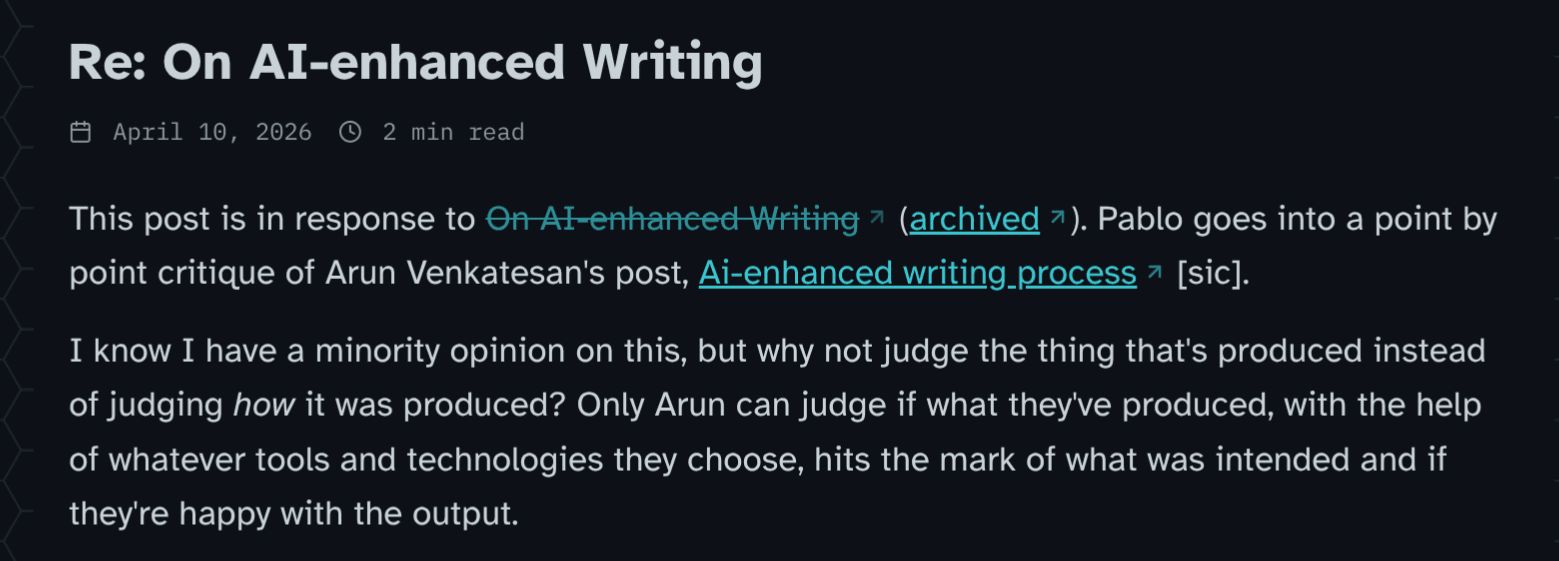
A dead link gets the strike thru treatment and an archived link.
Pablo broke the cardinal blogger rule. He changed the URL for his posts without having a redirect in place, breaking all the things anyone previously linked to.
We implement the (archived) link bit during build time. When the site builds, it checks links.json, and if it finds a dead one, it gives the link the above treatment. If later the link comes back, it automatically reverts this treatment.
Monitoring
To ensure this is working correctly, I've built some Uptime Kuma alerting. These scripts just run silently in the background, so they will fail silently too. Well not on my watch!
The alerts are very basic. If they don't get a heartbeat from the scripts, then that reports as an error and alerts me via email, and it goes onto my morning report that I email myself.
And that's pretty much it. Do you do anything to help with link rot or monitoring bad links on your own site?









Thread
@michaelharley@infosec.exchange I try to get in the habit of saving pages I reference in Archive.org, Archive.ph, and a local copy (usually the SingleFile plugin). Had too many pages either get altered or go offline that either weren't already archived by Archive.org (or more likely was on Archive.org, but that archive was old enough that the page changed between when it was archived, when I reference it, and then again when it went offline or was altered).
@michaelharley
> Well, we check it of course!
Checking for 200 is sadly not enough. I use onthisday feature to check older posts and I find often links that do resolve but the content changed wildly. Like when a domain grabber got their hands on a domain shipping ads on the old SEO juice. IMHO that's worse than rotten links.
@bekopharm Ah yes I hadn't really considered that threat model as I hadn't run into that myself. 🤔