Smarter Thermostat with Home Assistant
 Michael Harley
7 min read
Michael Harley
7 min read
A smart thermostat was one of the first connected devices I purchased when I started building our smart home. I wanted automatic presence detection so the thermostat could set an away mode when we leave and "we're home" mode without us having to do anything. Never mind the fact that Rachelle and I both work from home and are both homebodies. On the rare occasion that we're both away from home, the house knows it, automatically! ;)
Throughout the year, I'd find myself fiddling with the set points though. 68°F (20°C) in February feels different than 68°F in August. So twice a year, as the seasons started to tip over into warmer or colder weather, I'd change the upper and lower bounds.
It feels weird to run the AC in winter or the heat in summer. We sleep with the thermostat set at 65°F (18°C). Our preference for day time temp is 68°F to 72°F (20°C to 22°C). So when we wake up, and toggle sleep mode off in Home Assistant, the thermostat sets itself to the day time values and turns on the heat to raise the temp from 65 to 68; even in summer. That bothers me. I'd rather the thermostat just set the lowest temp to 68 and allow the house temp to naturally rise.
Plus, I have all these damn sensors in the house, outside the house, and a weather forecast available. I feel like I have all the inputs needed to make some data-driven decisions.
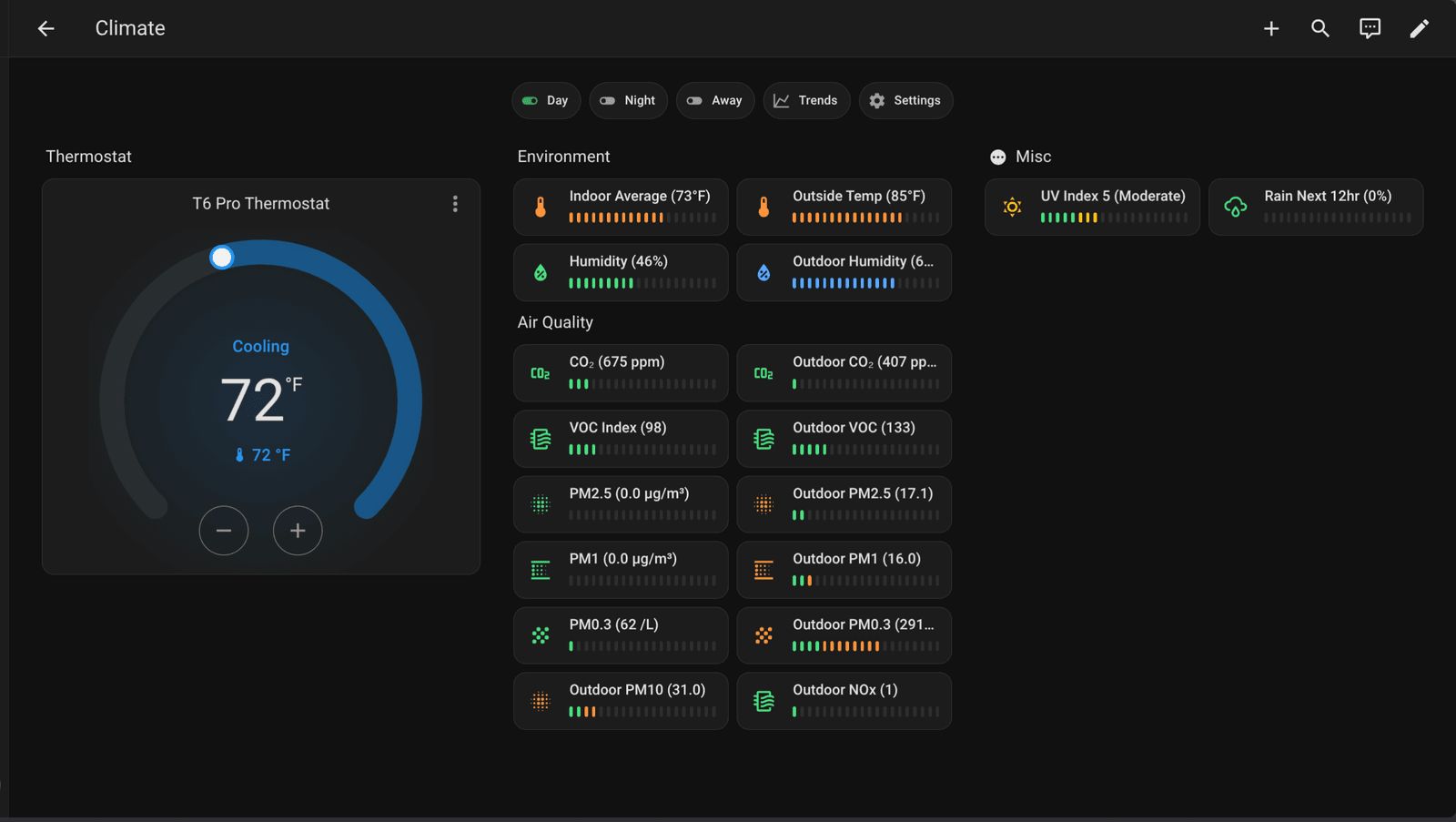
Goal
My goal was to stop running heat on summer mornings and AC on winter evenings. The set points stay fixed. What changes is the HVAC mode: heat-only, cool-only, or both.
Data
For Home Assistant to pick the right mode, it needs to know what's going on outside, so I made a couple of template sensors.
Outdoor Blend
It all comes down to one template sensor: sensor.outdoor_temp_blend. It's the average of three numbers: the current outdoor temperature, today's forecast high, and today's forecast low. The result tells me what kind of day this is rather than what the temperature is right this minute. That blend feeds sensor.thermostat_season, which labels the day heating, cooling or shoulder-season. The season is what picks the HVAC mode.
Why average instead of just reading the current outdoor temp? A 50°F dawn before a 75°F afternoon shouldn't kick the heater on for an hour at sunrise. The blend flattens out the time-of-day swings so the thermostat isn't reacting to a number that's about to change anyway.
- sensor:
    - name: "Outdoor Temp Blend"
      unique_id: outdoor_temp_blend
      device_class: temperature
      unit_of_measurement: "°F"
      state_class: measurement
      availability: >-
        {{ state_attr('weather.forecast_12_grimmauld_place', 'temperature') is not none
           and states('sensor.today_forecast_high') | float(none) is not none
           and states('sensor.today_forecast_low') | float(none) is not none }}
      state: >-
        {% set current = state_attr('weather.forecast_12_grimmauld_place', 'temperature') | float %}
        {% set high = states('sensor.today_forecast_high') | float %}
        {% set low = states('sensor.today_forecast_low') | float %}
        {{ ((current + high + low) / 3) | round(1) }}
Thermostat Season
sensor.thermostat_season reads the outdoor blend and labels the day as one of three states:
coolonce blend reaches 68°F, holds until blend drops below 65°Fheatonce blend falls to 55°F, holds until blend rises above 58°Fheat_coolfor everything in between
The mode scripts (thermostat_active_mode, thermostat_sleep_mode, thermostat_away_mode) read this sensor to decide whether the thermostat should run cooling only, heating only, or both with a deadband.
That 3°F gap on each side is on purpose. Without it, a blend hovering right at 68°F would flip the HVAC mode every time the value bounced from 67.9 to 68.1 across forecast updates. The hysteresis means the season has to meaningfully change before the mode does. Once it decides it's summer, it doesn't second-guess itself over one cool morning.
- sensor:
    - name: "Thermostat Season"
      unique_id: thermostat_season
      icon: >-
        {% set s = this.state %}
        {% if s == 'cool' %}mdi:snowflake
        {% elif s == 'heat' %}mdi:fire
        {% else %}mdi:swap-vertical{% endif %}
      availability: >-
        {{ states('sensor.outdoor_temp_blend') | float(none) is not none }}
      state: >-
        {% set blend = states('sensor.outdoor_temp_blend') | float %}
        {% set prev = this.state if this.state in ['heat','cool','heat_cool'] else 'heat_cool' %}
        {% if prev == 'cool' %}
          {# stay in cool until blend drops below 65 #}
          {{ 'heat_cool' if blend < 65 else 'cool' }}
        {% elif prev == 'heat' %}
          {# stay in heat until blend rises above 58 #}
          {{ 'heat_cool' if blend > 58 else 'heat' }}
        {% else %}
          {# in heat_cool, transition based on outer thresholds #}
          {% if blend >= 68 %}cool
          {% elif blend <= 55 %}heat
          {% else %}heat_cool
          {% endif %}
        {% endif %}
Helpers
I built some helpers that allow me to easily set the temperature range. They're just input_number helpers, one pair per mode: day, night and away. The scripts below read them by name, so when I nudge the day time high from 72 to 71 on my dashboard, that's the number the thermostat gets the next time anything runs.
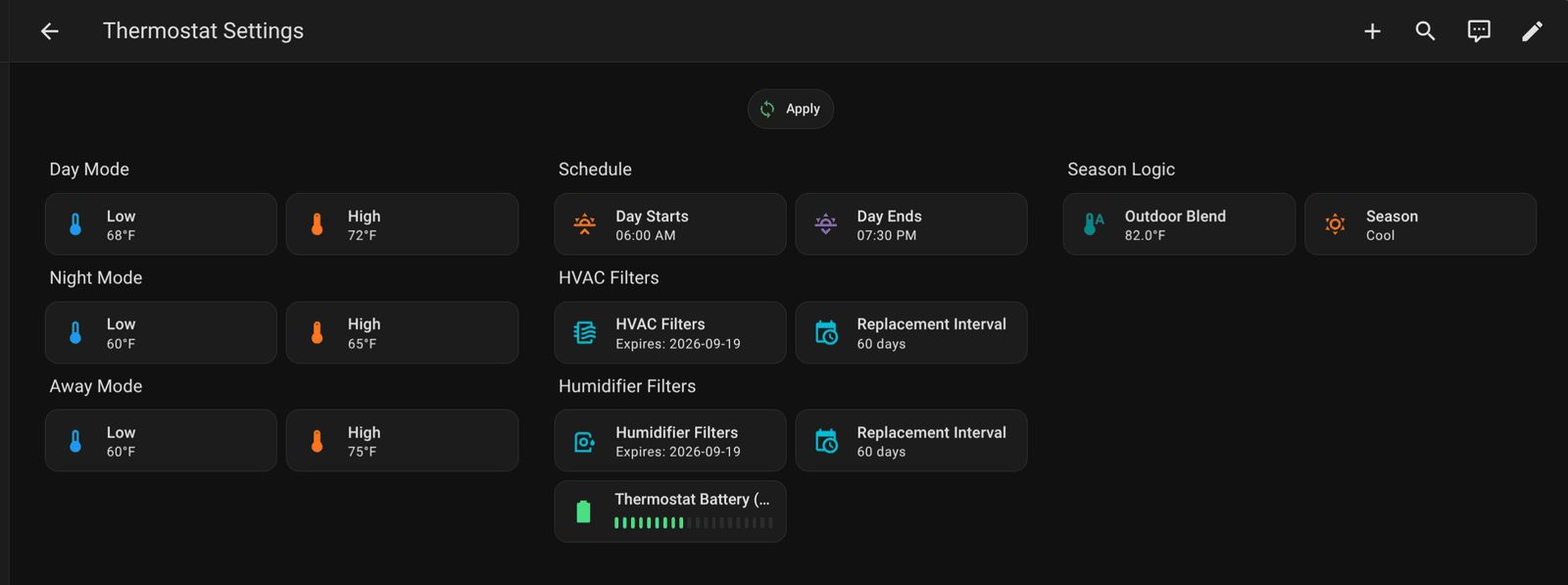
Putting it all together now
Three scripts do the actual work: thermostat_active_mode, thermostat_sleep_mode and thermostat_away_mode. They're deliberately dumb. Each one reads sensor.thermostat_season, picks a branch, and writes to the thermostat. That's the whole job. None of them know a thing about the weather.
Here's the day time one. I trimmed a couple of housekeeping steps off the end (it also flips some booleans and sets the fan mode) to keep the important part visible:
thermostat_active_mode:
  alias: Thermostat active mode
  sequence:
    - choose:
        - conditions:
            - condition: state
              entity_id: sensor.thermostat_season
              state: cool
          sequence:
            - action: climate.set_temperature
              target:
                entity_id: climate.t6_pro_z_wave_programmable_thermostat
              data:
                hvac_mode: cool
                temperature: "{{ states('input_number.thermostat_day_temp_high') | float }}"
        - conditions:
            - condition: state
              entity_id: sensor.thermostat_season
              state: heat
          sequence:
            - action: climate.set_temperature
              target:
                entity_id: climate.t6_pro_z_wave_programmable_thermostat
              data:
                hvac_mode: heat
                temperature: "{{ states('input_number.thermostat_day_temp_low') | float }}"
      default:
        - action: climate.set_temperature
          target:
            entity_id: climate.t6_pro_z_wave_programmable_thermostat
          data:
            hvac_mode: heat_cool
            target_temp_high: "{{ states('input_number.thermostat_day_temp_high') | float }}"
            target_temp_low: "{{ states('input_number.thermostat_day_temp_low') | float }}"
  mode: single
In cool season the script sets hvac_mode: cool and one number, the day time high. That's it. No lower bound anywhere in that call, so nothing can ask for heat. Winter is the same trick backwards, hvac_mode: heat and just the day time low. Only the shoulder season sends both numbers as a deadband, which is what I had before.
Sleep and away are the same shape. They just read their own pair of helpers.
What calls the scripts
Mostly, nothing new. My wake, sleep and away automations already called these three scripts, because that's how the house has worked for a while now. They picked up the season awareness for free. I didn't have to touch a single one of them. So that's cool.
The one thing I did have to add is an automation for when the season itself changes:
- id: thermostat_reevaluate_on_season_change
  alias: Thermostat, re-evaluate on season change
  triggers:
    - trigger: state
      entity_id: sensor.thermostat_season
      to:
        - heat
        - cool
        - heat_cool
  conditions:
    - condition: template
      value_template: >-
        {{ trigger.from_state is not none
           and trigger.from_state.state in ['heat','cool','heat_cool'] }}
  actions:
    - choose:
        - conditions:
            - condition: state
              entity_id: input_boolean.thermostat_away_mode
              state: "on"
          sequence:
            - action: script.thermostat_away_mode
        - conditions:
            - condition: state
              entity_id: input_boolean.thermostat_night_mode
              state: "on"
          sequence:
            - action: script.thermostat_sleep_mode
        - conditions:
            - condition: state
              entity_id: input_boolean.thermostat_day_mode
              state: "on"
          sequence:
            - action: script.thermostat_active_mode
  mode: single
Without it, a season flip in the middle of a Tuesday afternoon would just sit there. Nothing would be calling a script until bedtime. This one re-runs whichever mode is already active so the thermostat catches up.
The condition looks fussier than it needs to be. It's there because the season sensor drops to unavailable for a split second now and then, usually when the weather integration hiccups or Home Assistant restarts. Without the guard, every one of those blips would re-fire the thermostat. I went back through the last couple of weeks of history and it happened 16 times. So, worth having.
Conclusion
So, back to the thing that bugged me. Summer morning, house is sitting at 65, I toggle sleep mode off. The season is cool, so the script sends cool-only at 72 and there's no lower bound for the furnace to chase. The house drifts up to 68 on its own, for free, the way it would have anyway if I'd just left it alone.
I pulled the history to make sure I wasn't fooling myself. Over the last twelve days there were 13 mornings where the house was sitting at exactly 65°F when we got up, and the furnace ran for zero minutes. Under the old setup that's 13 mornings of running heat in the middle of summer.
I should say though, it's August. The heat branch has never actually fired for real. I've read it a dozen times and I think it's right. Ask me again in December.
I'm not an HVAC guy and there's almost certainly a smarter way to do this. What's your approach? Does your thermostat know what time of year it is, or do you fiddle with it twice a year like I used to?
Thread
Is there any brands or specific models that are recommended? I need a thermostat that is easy to set up.
We bought our house new and the builders installed Honeywell units. I was able to find the same unit but with Zwave and I could easily just unplug the old and plug the new one directly in and it just worked. The specific one I bought seems to be discontinued.
T6 Pro Z-Wave Thermostat