3½ Years With the ULTRALOQ U-Bolt Pro Z-Wave Smart Lock
 Michael Harley
5 min read
Michael Harley
5 min read
Rachelle and I bought our house in Richmond in late 2022 and moved in early 2023. The ULTRALOQ U-Bolt Pro Z-Wave Smart Lock was the very first smart device I installed after setting up Home Assistant.
Requirements
Our must-have requirements were the lock must work with Home Assistant, and it must have a fingerprint sensor. Everything else was just nice-to-haves.
The setup
After doing lots of reading about smart locks and Home Assistant, I eventually landed on the ULTRALOQ U-Bolt Pro Z-Wave Smart Lock. We have the same lock on both the front door and the back door btw!
I did have to install their app in order to set up users and modify PINs and such. But I only have to use their app if I'm updating users.
- Controller: Home Assistant Z-Wave JS
- Radio: Home Assistant Connect ZWA-2
- Locks: ULTRALOQ U-Bolt Pro Z-Wave Smart Lock
First impressions vs. now
Physically installing the locks was pretty straightforward, and the instructions were clear. The Z-Wave onboarding workflow was the standard one for Z-Wave devices. You put Home Assistant and the device in pairing mode, and then you confirm with the PIN from the device. Easy peasy.
I'd say the build quality is average. It's nothing to write home about but the locks seem sturdy enough. I've had to tighten the mounting screws up at least once over the past 3½ years, which I think is a normal and expected thing, so no points off there.
Living with them day to day
The #1 usability requirement for us was the fingerprint sensor on the lock. We did not want to have to mess with keys or fish out our phones or even enter a code to unlock the doors. So the main way, other than our arriving-home automations, that we unlock the door is with our fingerprints.
The fingerprint reader works fine. We often have to try the sensor twice, but it's not a huge problem. A more accurate sensor would be nice!
The other main use case is friends or pet sitters who come to feed the cats while we're out of town. For that, we just provide people with the door code and that has generally worked reliably. There was one time when our friends were trying to gain access in the afternoon when the front door lock was directly in the sun and had overheated or something. Our friend couldn't make the lock work. We had to unlock it remotely but that only happened once.
Reliability over 3½ years
I've had very few problems with the locks. As previously noted, we did have an issue with the lock overheating because it was directly in the sun during the summer, and it just kind of became unavailable for a little bit.
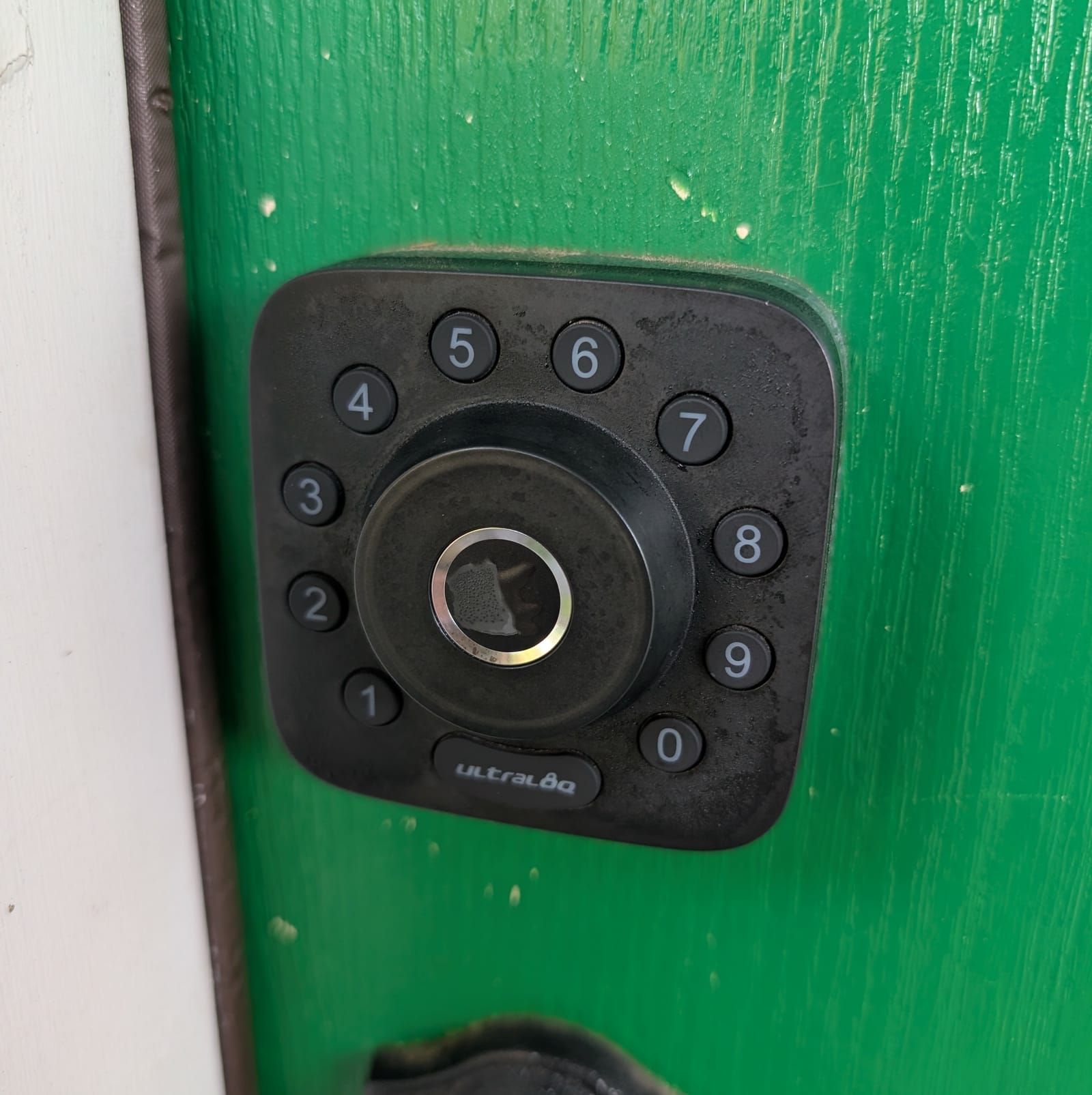
The coating on one of the fingerprint sensors has started to peel/flake, as you can see in the photo below. It doesn't seem to affect the accuracy of the sensor though as it still works fine!
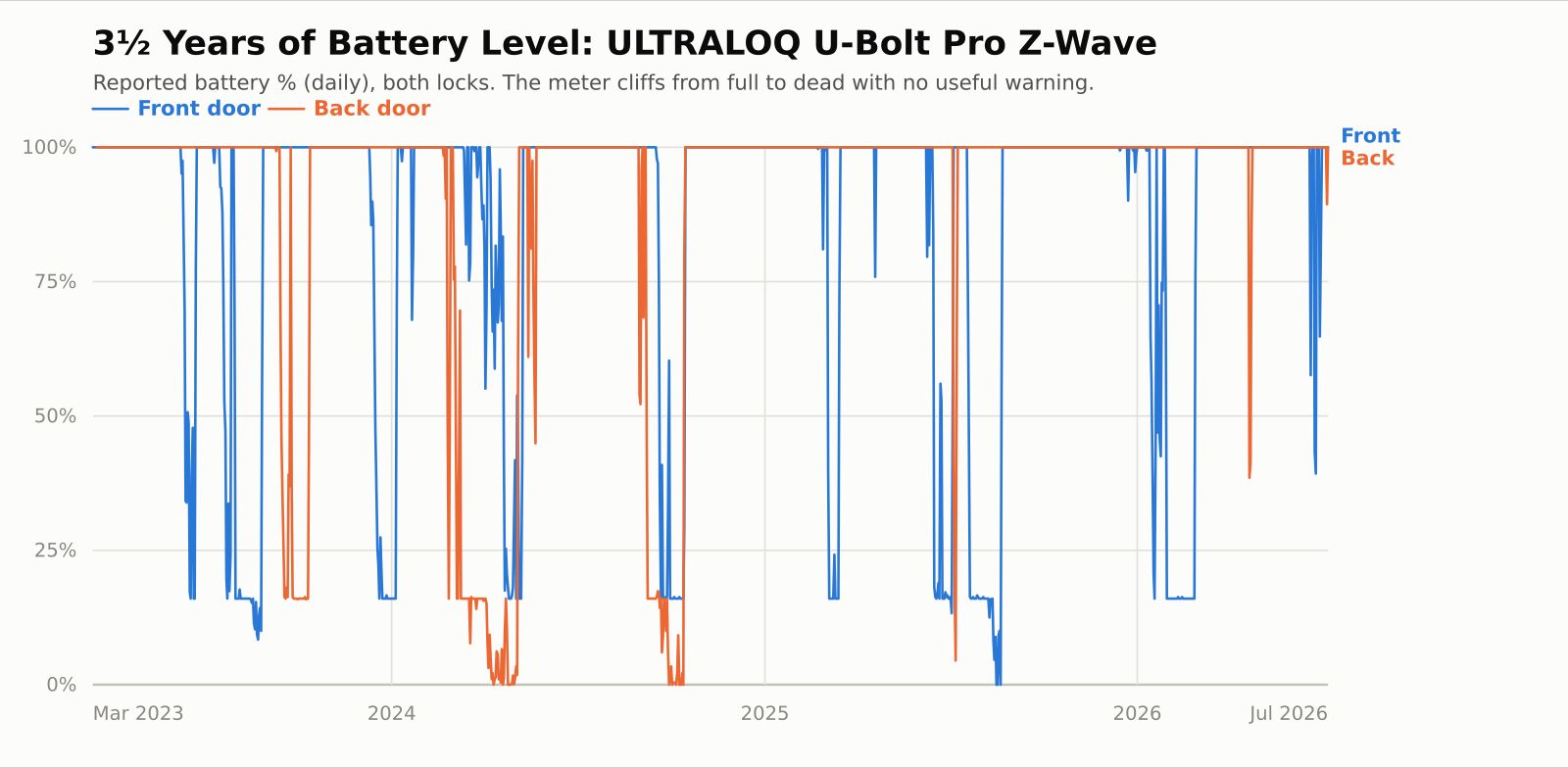
I pulled the Home Assistant data, and we have to replace the batteries about every three months or so. We tried rechargeable, but they don't really work that well, so we went back to Energizer disposable. The gold standard would be a lock that was on mains power with a built-in battery backup. The main problem is that the locks don't seem to update their reported battery level until it drops to about 16%, so it basically goes from 100% to 16% (and sometimes straight to 0%) after 3 months.
Home Assistant / Z-Wave
Once I added the locks to Home Assistant, they work locally without their app. The only thing we need the app for is if we're modifying users/PINs.
Here are our main automations:
- Automatic locking: The locks automatically lock themselves after 10 minutes.
- Bed time locking: When the house goes into sleep mode, the locks automatically lock.
- People leaving locking: When Home Assistant detects someone has left the home zone, the locks automatically lock.
- Arriving home automatic unlock: When Home Assistant detects someone has returned home from being away, the doors automatically unlock. This one is probably my favorite!
What broke / what annoyed
Nothing has really flat out broken, but there are a few annoyances.
Fingerprint sensor and humidity
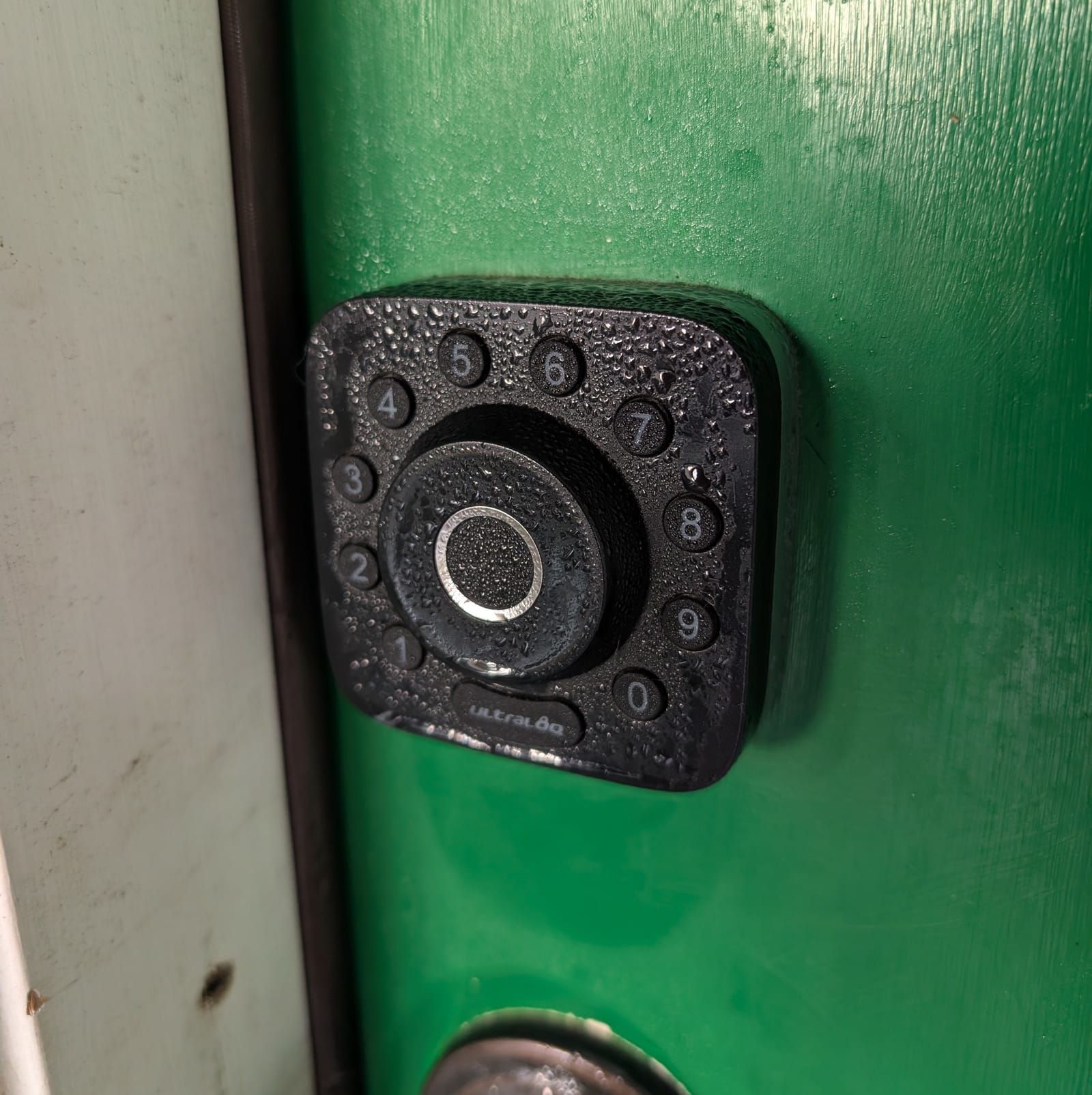
We live in Richmond, VA and it gets humid here in the summer. Every morning for about 2 months, both locks are beeping when we get up. Moisture has accumulated from humidity on the fingerprint sensor, and it's reading it like someone is trying to use the sensor. They just beep and beep and beep for a few hours in the morning. Both the front door and the back door have coverings. The front porch is a porch, of course, and the back porch has a big permanently attached awning, so neither lock is directly open to the elements. This is by far the #1 annoyance.
Unreliable battery reporting
As previously mentioned, the battery reporting is not very good. The locks only report their battery level when they get to about 16%, then it drops from 100% to 16% in an instant. It hasn't bit us yet, but it would be better if it would report the battery level in the way everyone expects it to.
More accurate fingerprint sensor
This is a minor quibble but it would be nice if the fingerprint sensor were more accurate. This has not been a deal breaker for us but still.
Verdict
Overall, the locks are fine. I'd give them three stars out of five. I think these specific locks are discontinued now, though, so even if I did want to recommend them, I don't think it's possible for someone to buy one new.
The perfect lock for our use case would be a Yale or Schlage lock that was officially in the Works with Home Assistant program, worked over Z-Wave, and had an accurate and moisture-resistant fingerprint sensor.
What's your favorite smart lock and why did you pick it?



Thread
Sorry about the managed post at first.
I'm new to the community so sorry about the basic question but is this type of post ok here? This is a blog post that I put on my site. Do we prefer to have the full post like this with the link or do we prefer to just have a link and intro?
A AbidanYre via Lemmy
I don't speak for everyone here, but I appreciate this thorough review after long term use a lot more than some unboxing video or "here's a bunch of screen shots of the installer and default gnome desktop" that gets called a review when a new Linux distro is released.
C canthangmightstain via Lemmy
These are the kind of posts that I like to see! I appreciate the time and effort that went into this, hopefully I can contribute something similar soon!
V varyingExpertise via Lemmy
This kind of post would have been dug out of a forum in the olden days when I would have been looking for a smart lock. So, I'd say, for me this here would be a place to drop that kind of experience documentation for someone else to find. Why not.
J JelleWho via Lemmy
Nice write up!
We went with Nuki (I wanted something european). It's not a replacement, but rather a smart-key. Has been rock solid connectivity and locking, and it's wired in but has a 6month battery on board. When using a wifi connection they can be controlled over MQTT with Home Assistant
The downside is that finger print don't work well in the rain, but it also has numbers.
We also has a few delivery drivers get confused what button is the doorbell. But that was fixed with a bell sticker icon on the doorbel
U uhmbah via Lemmy
Great contribution. Thank you
I was wondering if you would be willing to try or consider the latest Bolt Z-Wave (which supports Z-Wave Long Range), to see if it offers any improvement in signal and user experience compared to the previous U-Bolt Pro Zwave.