My KeePass and Syncthing setup
 Michael Harley
4 min read
Michael Harley
4 min read
I've seen a few people talking about KeePass and Syncthing and hosting their own passwords, so I thought I'd use this as an opportunity to provide a simple overview of my own setup. I've been using some combination of KeePass and Syncthing since 2021.
Syncthing
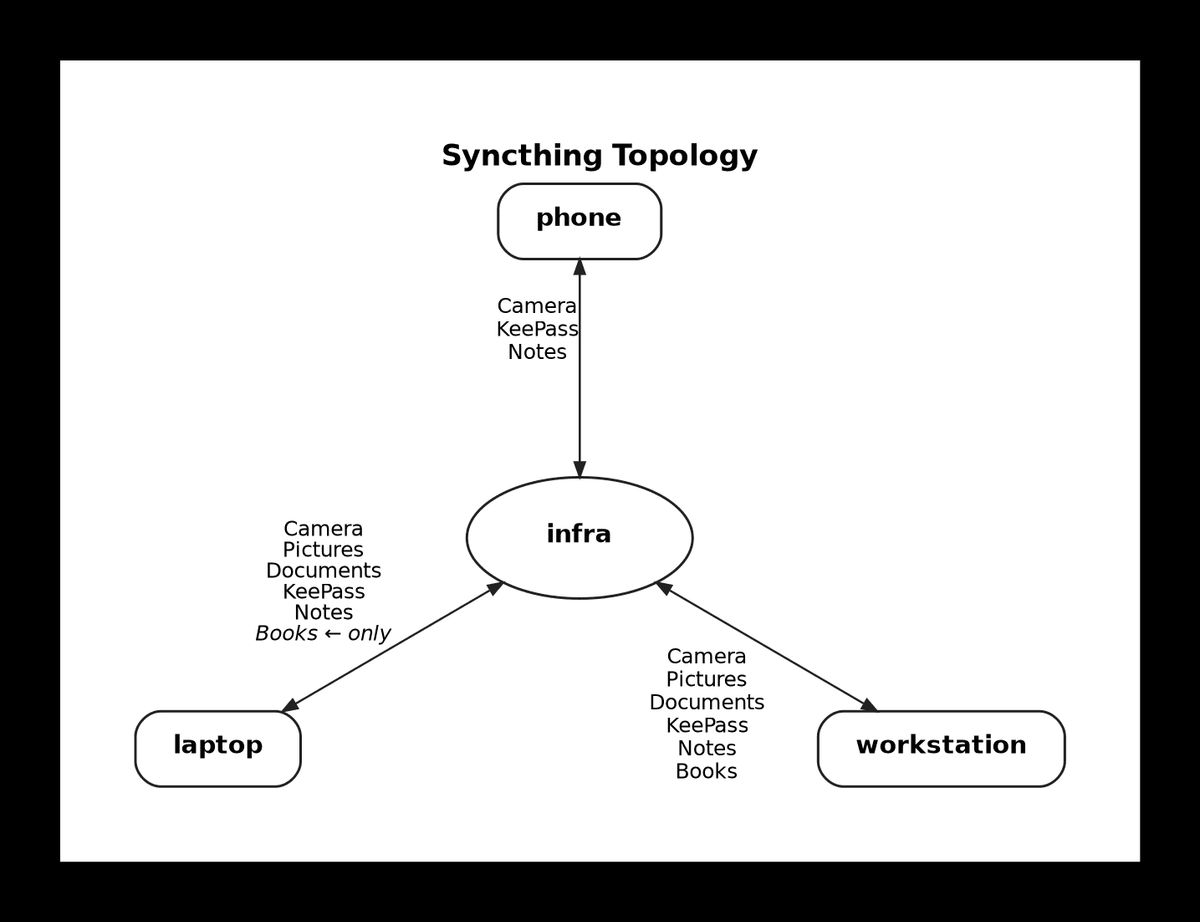
My Syncthing topology is a simple star topology. I have a Proxmox LXC set up as the star hub. Then my laptop, workstation and Android phone sync to the LXC (infra).
KeePassXC
I'm using KeePassXC on my Linux computers, and I find the application to be basic but serviceable. I use the browser extension for Firefox and that mostly works pretty well. It's not as full-featured or polished as 1Password, but it stores passwords just fine. One of the main things I miss from 1Password is the different data types. That's probably my #1 request!
I have augmented KeePassXC with a couple scripts.
New masked email
1Password has this 'masked email' feature, and it connects to Fastmail to create masked emails. Well, I like that feature, but I don't have 1Password, so I made my own version.
This script takes a URL from a website and generates a masked email with a bit of randomness tacked in. It accepts the URL in basically any format and pulls the domain out for me.
Then it saves the new masked email to my KeePass file via keepassxc-cli and copies it to my clipboard, ready to paste into the new site I'm registering for. So the workflow is:
- Run script, paste in URL.
- Script prompts for KeePass password.
- Script adds a new entry to KeePass and copies the masked email to my clipboard.
- I flip back to my browser and paste in the email.
#!/usr/bin/env bash
set -euo pipefail

KDBX="$HOME/KeePass/password-file.kdbx"
keepassxc-cli() { flatpak run --command=keepassxc-cli org.keepassxc.KeePassXC "$@"; }

read -rp "Domain or URL (e.g. amazon.com, https://infosec.pub/): " input

if [[ -z "$input" ]]; then
  echo "Error: domain is required" >&2
  exit 1
fi

# Strip protocol, path, port, query string, and whitespace → extract registrable domain
host=$(echo "$input" | sed 's|^[a-zA-Z]*://||; s|[:/\?].*||; s|[[:space:]]||g')
# Keep last two parts (or three for two-letter TLDs like .co.uk, .com.au)
tld=$(echo "$host" | grep -oP '\.[a-z]{2,3}\.[a-z]{2}$' || true)
if [[ -n "$tld" ]]; then
  domain=$(echo "$host" | grep -oP '[^.]+\.[a-z]{2,3}\.[a-z]{2}$')
else
  domain=$(echo "$host" | grep -oP '[^.]+\.[^.]+$')
fi

random=$(head /dev/urandom | tr -dc 'a-z0-9' | head -c 8)
name=$(echo "$domain" | sed 's|\.[^.]*$||')
email="${name}.${random}@my-sekrit-domain.com"

echo ""
echo "Email:  $email"
entry="Logins/$domain ($random)"
echo "Entry:  $entry"
echo ""

keepassxc-cli add "$KDBX" "$entry" \
  -u "$email" \
  --url "https://$domain" \
  -g -L 32 -l -U -n -s --every-group

echo "$email" | wl-copy
echo ""
echo "Copied email to clipboard: $email"
Resolve KeePass sync conflicts
Others have mentioned sync conflicts with KeePass and Syncthing, and I've hit that a few times myself. To help me resolve this, I wrote a little bash script that uses keepassxc-cli to merge sync conflicts. So when I notice I have a sync conflict, this is the workflow:
- Script scans my KeePass folder for conflict files.
- Lists every conflict file it found and asks me to confirm.
- Prompts me for my master password once.
- Backs up my main DB, then merges each conflict file in turn.
- Archives the merged conflict files under
.stversions/.
This has worked pretty well for me the 5 or 6 times I've used it.
#!/usr/bin/env bash
# Merge Syncthing conflict .kdbx files into the main KeePass DB.
# Uses `keepassxc-cli merge --same-credentials` — one password prompt,
# per-entry newest-wins resolution.
set -euo pipefail

KEEPASS_DIR="${KEEPASS_DIR:-$HOME/KeePass}"
MAIN_DB="${MAIN_DB:-$KEEPASS_DIR/password-file.kdbx}"
ARCHIVE_DIR="$KEEPASS_DIR/.stversions"
KPXC=(flatpak run --command=keepassxc-cli org.keepassxc.KeePassXC)

red() { printf '\033[31m%s\033[0m\n' "$*"; }
grn() { printf '\033[32m%s\033[0m\n' "$*"; }
ylw() { printf '\033[33m%s\033[0m\n' "$*"; }

[[ -f "$MAIN_DB" ]] || { red "Main DB not found: $MAIN_DB"; exit 1; }

if pgrep -x keepassxc >/dev/null || pgrep -f 'org.keepassxc.KeePassXC' >/dev/null; then
  ylw "WARNING: KeePassXC GUI is running. Merge will write to disk, but the GUI"
  ylw "will not reflect changes until you close and reopen the database."
  read -rp "Continue anyway? [y/N] " ans
  [[ "$ans" =~ ^[Yy]$ ]] || { echo "Aborted."; exit 0; }
fi

mapfile -t conflicts < <(find "$KEEPASS_DIR" -maxdepth 1 -name '*.sync-conflict-*.kdbx' | sort)

if [[ ${#conflicts[@]} -eq 0 ]]; then
  grn "No sync-conflict files found in $KEEPASS_DIR"
  exit 0
fi

echo "Found ${#conflicts[@]} conflict file(s):"
for f in "${conflicts[@]}"; do echo "  - $(basename "$f")"; done
echo
read -rp "Merge all into $(basename "$MAIN_DB")? [y/N] " ans
[[ "$ans" =~ ^[Yy]$ ]] || { echo "Aborted."; exit 0; }

mkdir -p "$ARCHIVE_DIR"
stamp=$(date +%Y%m%d-%H%M%S)
backup="$ARCHIVE_DIR/password-file~pre-merge-${stamp}.kdbx"
cp "$MAIN_DB" "$backup"
grn "Backup: $backup"

merged=0
failed=0
for conflict in "${conflicts[@]}"; do
  echo
  echo "Merging: $(basename "$conflict")"
  if "${KPXC[@]}" merge --same-credentials "$MAIN_DB" "$conflict"; then
    mv "$conflict" "$ARCHIVE_DIR/$(basename "$conflict" .kdbx)~merged-${stamp}.kdbx"
    grn "  merged"
    ((merged++))
  else
    red "  FAILED — conflict file left in place"
    ((failed++))
  fi
done

echo
grn "Merged: $merged"
[[ $failed -gt 0 ]] && red "Failed: $failed"
KeePassDX
I use KeePassDX on my Android phone, and it works fine. It's nothing special, but it gets me to all my passwords. FWIW, I'm a computer-oriented person and what I do with passwords on the phone is 99% just logging in to services or sites.
What do you use for your passwords?









Thread
@michaelharley typo in link ;-)
Oops. Fixed the link typo. Thanks for the heads up.
Just testing this comment to see how it shows.